Recording and live views
Most of kudio works on audio that is already in a file. This page is about audio that is still arriving: taking it from a microphone or from a device on the network, drawing or denoising it while the take runs, and playing it back.
What needs the audio extra
kudio reaches the hardware through two Python bindings of PortAudio and
imports each one only when it needs it, so import kudio works without
either. PyAudio publishes wheels for Windows only;
Getting started says what Linux and macOS need to
build it. The classes in the last row of the table need neither package and
run on the core install.
| Backend | Used by |
|---|---|
| sounddevice | record, list_devices, play_audio |
| PyAudio | StreamRecorder, Recorder, LocalStreamReader, RemoteStreamReader, CheckDevice, play_audio on an open wave.Wave_read, and for anything else when sounddevice is missing |
| neither | SpectrogramStream, StreamEnhancer, AudioBuffer, FetchBuffer |
Without the extra, everything here that needs a binding raises
DependencyError naming kudio[audio];
it is an ImportError as well. sounddevice installed on a Linux machine
without the PortAudio library is not a missing extra, since pip cannot fix it,
so that raises DeviceError naming the system
package instead.
A fixed-length take with record
record blocks for the whole take and returns it:
import kudio

y = kudio.record(seconds=3, sr=16000)          # blocks for 3 s
kudio.save_wave("take.wav", y, 16000)
The result is float32 with int(seconds * sr) samples, shaped (n,) for mono
and (n, channels) otherwise, the layout
file_load and
save_wave use. A script that knows how long it
wants needs nothing more. A person at a microphone does, because nothing can be
seen until the call returns.
Recording until you stop: StreamRecorder
StreamRecorder captures on PortAudio's
own thread and keeps every sample, and your code asks it how things are going
whenever it likes. The speaker sees the level before saying anything, and the
take ends when the sentence does. As a context manager it starts on entry and
closes the stream on exit; in a GUI, call
start() and
stop() from the Record and Stop
buttons instead.
import time

import kudio

with kudio.StreamRecorder(sr=16000) as rec:
    print(f"{rec.sr} Hz, {rec.channels} channel(s)")   # what the device agreed to
    while rec.elapsed() < 5.0:                         # or until someone clicks Stop
        print(f"\r{rec.level_db():6.1f} dBFS", end="")
        time.sleep(0.1)
y = rec.stop()                                         # float32, (n,) for mono
kudio.save_wave("take.wav", y, rec.sr)
sr= is a request. If the device refuses it, kudio tries 16000, 22050 and
44100 Hz in that order, then the device's own default, logs the choice at INFO
level and carries on; with sr left out it runs the same search. Asking for
96 kHz from a device that opens at 48, 44.1 and 16 kHz therefore records at
16 kHz. A channels= above what the device has falls back to mono with a
warning. rec.sr and rec.channels are
what the take is really in, so save with those. When the input will not open
at all, it raises DeviceError.
While it runs, these are safe to call from any thread:
| Call | Returns |
|---|---|
level() |
peak of the most recent chunk, linear 0 to 1 |
level_db() |
the same in dBFS, -inf for digital silence |
elapsed() |
seconds captured so far |
tail(seconds) |
the most recent seconds of audio |
drain() |
everything since the previous drain() |
take() |
everything so far, without stopping |
The level is a peak, so it says how close the take comes to clipping, not how
loud it sounds; measure that on the finished take with
loudness
(Inspecting a recording). A chunk is frame_size samples
(1024 by default, 64 ms at 16 kHz), so the reading changes about 15 times a
second.
A second stop() returns the same take, not an empty array. stop() also
shuts down the recorder's PyAudio instance, and a start() after it opens the
stream again with the same settings and carries on the same take, the way a
Pause button would. If the device comes back at another rate or channel count,
start() raises DeviceError rather than join the two in one take;
reset() throws the take away, so
call it first for a new one. It works on an open stream as
well and goes on recording. I cap the take at max_seconds
(3600 by default, None for no cap) so that a recorder left running cannot
fill memory: an hour of 16 kHz mono float32 is 230 MB. At the cap the take
stops growing and capped turns
true, but the level keeps updating, so a meter on screen does not freeze.
monitor=True plays the input through the default output while it records.
tail() for a display, drain() for everything else
tail(seconds) is a sliding window, so two calls a tenth of a second apart
return mostly the same samples, which suits a waveform redrawn on every tick.
Anything that keeps state needs each sample once, and that is what drain()
gives: the spectrogram and the denoiser below, or a file written as the take
goes. Fed from tail(), a spectrogram draws the overlap twice and at the wrong
time, and a denoiser runs its recursive estimates over audio it has already
seen. drain() hands over whole chunks, so a timer that ticks faster than
chunks arrive gets an empty array now and then, which push() and process()
below both accept; reset() starts the drain position over.
Choosing a device
sounddevice and PyAudio number the same devices independently, so an index from one list can name a different device in the other, or none at all. Pass each function an index from the backend it runs on:
| Index from | Pass it to |
|---|---|
list_devices() (sounddevice) |
record(device=...) |
CheckDevice().system_devices() (PyAudio) |
StreamRecorder, Recorder, LocalStreamReader |
From a shell, kudio devices prints both lists, each labelled with where its
indices go (Command line).
Leaving device out does not pick the same input everywhere. record takes
sounddevice's default input and Recorder PortAudio's, but StreamRecorder
and LocalStreamReader go through
CheckDevice.input_device, which
tries every device PyAudio knows and takes the last one that opens as an
input. That can belong to a host API that system_devices does not list,
since it covers only PyAudio's first. So whenever it matters which input
records, pass device. To see what StreamRecorder settled on, call
logging.basicConfig(level=logging.INFO) before creating it; kudio then logs
the device's index and name and the rate it chose.
CheckDevice finds out what a device accepts
by opening it.
check_available_rate(device)
returns those of twelve standard rates, 192000 down to 6000 Hz, that open, or
False when the device does not open as an input at all, and
check_device() runs one round of listing
the devices and resolving an input, returning True or False with the
reason in the log.
A live spectrogram: SpectrogramStream
STFT and
waveform_to_spectrogram want
the whole clip. The obvious live view, re-running the transform over the last
few seconds on every redraw, spends nearly all its time recomputing what is
already on screen: with the defaults below the window is 375 columns wide, and
at 20 redraws a second each redraw adds about 6.
SpectrogramStream computes each
column once, when its samples have arrived, and keeps the last few seconds in a
ring buffer.
import numpy as np
import kudio

sr = 16000
t = np.arange(2 * sr) / sr
y = (0.5 * np.sin(2 * np.pi * 1000 * t)).astype(np.float32)   # 2 s at -6 dBFS

view = kudio.SpectrogramStream(sr, seconds=3.0)
print(view)
for start in range(0, len(y), 700):        # whatever block size the device uses
    new = view.push(y[start:start + 700])  # the columns this block completed
print(view.columns().shape, view.filled, view.frames_seen)
print(view.latency_seconds, view.column_seconds, round(float(view.latest().max()), 2))
SpectrogramStream(sr=16000, n_fft=512, hop_length=128, 257 bins, 3.00s window)
(375, 257) 247 247
0.032 0.008 -6.02
push() takes a block of any
length, zero included, holds back samples that do not yet complete a frame, and
returns the columns the block finished, (new_columns, bins) in dB, oldest
first. Blocks of 1, 97, 128, 512 or 4096 samples give byte-identical columns
(the test suite checks that), so the picture does not depend on the chunk size
the device picked. The first column waits
latency_seconds
for a whole frame (n_fft / sr), and the rest follow
column_seconds
apart (hop_length defaults to n_fft // 4).
columns() is the window
as an image: (n_columns, bins), oldest row first, so transpose it to put time
across and the newest column lands on the right. It is full width from the
first call, with floor_db
on the left until enough audio has arrived: a display that grew from nothing
would rescale its time axis on every redraw, which reads as the picture
jittering rather than as the recording starting.
latest() is the newest
column alone, a spectrum for an instantaneous readout, and
freqs holds each row's
frequency in Hz for labelling the axis.
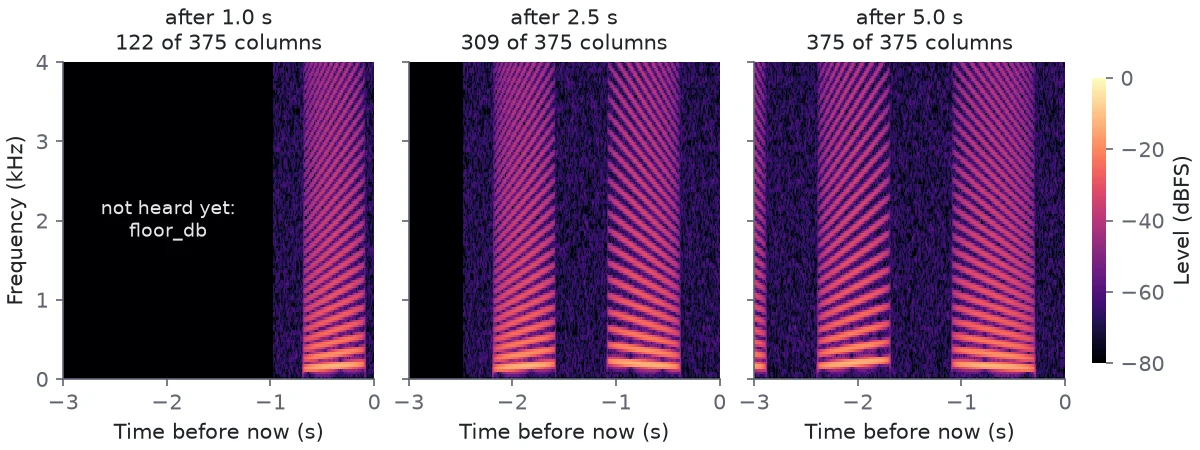
One synthetic stream, pushed in 1024-sample blocks and drawn three times. After 5 s the first syllable has scrolled off the left edge.
Drawing it with matplotlib
SpectrogramStream holds no lock. Push and draw from the same thread (a UI
timer is the natural one) and leave the crossing between threads to
StreamRecorder, whose drain() is safe from anywhere. With matplotlib
(kudio[viz]) and a microphone, the whole live view is this:
import matplotlib.pyplot as plt
from matplotlib.animation import FuncAnimation

import kudio

rec = kudio.StreamRecorder(sr=16000).start()
view = kudio.SpectrogramStream(rec.sr, seconds=3.0)

fig, ax = plt.subplots()
image = ax.imshow(view.columns().T, origin="lower", aspect="auto",
                  vmin=view.floor_db, vmax=0.0,
                  extent=(-view.window_seconds, 0.0, 0.0, rec.sr / 2))
ax.set_xlabel("Time before now (s)")
ax.set_ylabel("Frequency (Hz)")
fig.colorbar(image, label="dBFS")


def update(_):
    view.push(rec.drain())
    image.set_data(view.columns().T)
    return [image]


anim = FuncAnimation(fig, update, interval=50, blit=True, cache_frame_data=False)
plt.show()                                 # returns when the window is closed
y = rec.stop()
Levels are dBFS, so keep the colour range fixed
Each column is scaled by its window, so on the linear axis a full-scale sine
reads 0 dB whatever n_fft and window are, and the half-scale sine above reads
-6.02 dB. A tone that falls between two bins reads up to 1.4 dB low with the
Hann window; that is the window's scalloping loss, not a change in level.
Anything more than top_db (80) below ref (full scale by default) is clamped
to floor_db, so an empty room draws as one flat colour instead of amplified
dither.
Because the numbers mean something, the live view draws with
vmin=view.floor_db, vmax=0, and so does the figure. A colour scale that
follows the loudest pixel stretches room tone to the brightness of speech
whenever nobody is talking, and then the picture no longer says how loud
anything is.
A mel axis is for looking
n_mels=64 puts the rows on a mel scale, bounded by fmin and fmax. Voiced
speech puts most of its energy below 1 kHz, which is an eighth of a linear axis
at 16 kHz; with 64 mel bands a third of the rows sit there. The mel values are
not dBFS, though. The filters are librosa's, area-normalised, so a band's value
depends on its width, and a full-scale sine reads well below 0 dB:
| Full-scale sine | Linear axis | 64 mel bands |
|---|---|---|
| 300 Hz | -0.9 dB | -17.6 dB |
| 1 kHz | 0.0 dB | -18.2 dB |
| 4 kHz | 0.0 dB | -24.1 dB |
The 80 dB clamp comes after the filters, so it costs the mel view those 18 to
24 dB of range: with 64 bands a 1 kHz tone at -70 dBFS already sits on the
floor. For a mel view, set vmax to about -15 or raise top_db. The row labels in
freqs are the filters' centres, not fmin and fmax: 46 to 7626 Hz with
64 bands at 16 kHz. Read levels off the linear axis, and use the mel one to see
what is being said.
Columns are not centred
The offline STFT pads the start so that column k is centred on sample
k × hop. A stream cannot pad audio it has not heard yet, so here column k
covers samples [k*hop, k*hop + n_fft), librosa's center=False convention,
which the test suite checks the columns against. A live column is therefore
half a frame later than the offline column with the same index.
to_stft() gives the
matching STFT geometry to store beside a recording; the half-frame offset
still applies when the two are compared.
Mono only
push() takes mono. I made it refuse a 2-D block with a
FeatureError rather than flatten it,
because flattening interleaved channels analyses a signal nobody recorded. Mix
a two-channel take down with y.mean(axis=1) first, as the message says.
Denoising on the way in
StreamEnhancer is one more consumer
of drain(). Put it in front of the view and the picture shows what comes out.
In the live view above, create the enhancer next to the view and change
update():
enhancer = kudio.StreamEnhancer(rec.sr, "logmmse")   # 32 ms behind at 16 kHz


def update(_):
    view.push(enhancer.process(rec.drain()))
    image.set_data(view.columns().T)
    return [image]
Denoising covers which methods stream, where the delay comes
from and why quantile cannot. Like push(),
process() takes mono and
refuses a two-channel block with FeatureError. Record mono, or mix down with
block.mean(axis=1) before handing a block to either.
kudio has no block-by-block output for listening to the result:
monitor=True on the recorder echoes the raw input, and play_audio is for
finished arrays. Gapless playback of processed blocks needs an output stream of
your own, such as a sounddevice.OutputStream.
Playing audio
play_audio takes an array with its rate, a
path, or an open wave.Wave_read. For most failures it returns a message
instead of raising, so check what comes back. numpy's default dtype is
float64, and arrays must be int16 or float32:
import numpy as np
import kudio

tone = np.sin(2 * np.pi * 440 * np.arange(16000) / 16000)    # float64
print(kudio.play_audio(tone, 16000))
tone.astype(np.float32) plays; file_load returns float32 already. An array
goes to sounddevice when it is installed, which plays in the background and
returns at once, so a script that ends on the next line cuts the sound off;
sounddevice.wait() blocks until it has finished. Without sounddevice the
array goes through PyAudio, which blocks until the end. Either way a
(frames, channels) array plays on as many channels. With neither installed,
play_audio raises DependencyError.
A path is read with soundfile, so anything file_load opens plays, FLAC and
FLOAT WAV included, and a file that cannot be read returns a message. An open
wave.Wave_read goes to PyAudio as it is; a 32-bit integer file plays as
32-bit integers there, although PyAudio would take that sample width for
float32 left to itself.
The lower-level pieces
StreamRecorder sits on LocalStreamReader, which resolves its device with
CheckDevice. The pieces below are there for when its choices do not suit:
int16 rather than float32, chunks handed to your own code, or audio arriving
over the network.
Recorder
Recorder is the blocking, fixed-length
recorder on PyAudio, and it returns int16 rather than float32:
import kudio

with kudio.Recorder(record_times=3, rate=16000) as r:   # PortAudio's default input
    y = r.start_record()                       # int16, (n,) for mono
    r.save("take.wav")                         # 16-bit WAV; True or False
It opens the device, rate and channel count it is given, with no fallback: a
device that refuses them makes
start_record() raise PyAudio's
OSError, not DeviceError. It reads frames_per_buffer (512) samples per
channel at a time, int(rate / frames_per_buffer * record_times) times, so
three seconds at 16 kHz is 93 reads: 47,616 samples per channel, or 2.976 s.
save(resample=...) resamples what was
captured, channel by channel, so those 2.976 s stay 2.976 s at the new rate
and every pitch stays where it was. For the array in memory,
resample does the same along the frames:
import numpy as np

x = y.astype(np.float32) / 32768               # y from start_record() above
y8 = kudio.resample(x, orig_sr=16000, target_sr=8000)
kudio.save_wave("take-8k.wav", y8, 8000)
LocalStreamReader
LocalStreamReader opens an input
through PyAudio and hands every chunk to an AudioBuffer, to an on_frame
callback, or to both:
import time

import numpy as np
import kudio

chunks = []
reader = kudio.LocalStreamReader(device=1,          # a PyAudio index
                                 rate=16000, frame_size=1024,
                                 on_frame=chunks.append)
if reader.get_status():                        # False: no input would open
    device, rate, channels = reader.get_setup()   # what the device agreed to
    reader.stream_start()
    time.sleep(3)
    reader.terminate()
    take = np.concatenate(chunks)              # int16, channels interleaved
Each chunk is one-dimensional, frame_size × channels values with the
channels interleaved: int16 by default, float32 with
wav_format=kudio.PA_FLOAT32 (1, PortAudio's code for float32). rate and channels are requests, settled as
for StreamRecorder. get_setup() returns what was opened, and None once
terminate() has run, so ask before that. A device that will not open does
not raise here: the reader stays uninitialised and get_status() says so,
which lets a GUI offer to try again. stream_start() or play_audio() on
such a reader raises DeviceError.
on_frame runs on PortAudio's thread, so store the chunk and return, and do
the processing elsewhere. kudio catches and logs an exception raised inside
it, and the stream keeps going. Uncaught, PyAudio would print the traceback
and abort the stream, so one bad chunk would end the take.
AudioBuffer and FetchBuffer
An AudioBuffer is a bounded FIFO, and it is
a monitor, not a recorder: once it holds size chunks (2 by default),
add() drops the oldest to make
room. A display wants that, the newest audio and never a growing backlog. A
take does not, which is why StreamRecorder collects through on_frame
instead. The buffer's method names call chunks frames.
get() blocks until a chunk arrives, or
raises TimeoutError after timeout seconds.
get_fixed_size_data(n)
waits for the next n chunks and returns them joined end to end. It collects
them on the way in, before anything is dropped, so a slow consumer cannot cost
it a chunk, and chunks already waiting are not part of it. It refuses n = 0,
which is what int(seconds * sr / chunk) gives for anything shorter than one
chunk, because that wait would never end, and a count that is not a whole
number. With timeout= it raises TimeoutError when the time runs out, and
the capture ends with it, so nothing is left waiting to take the next
capture's chunks.
FetchBuffer(buf).get_data(n, timeout=...)
runs the same wait on a thread of its own, once per FetchBuffer, and raises
the same way; the buffer can be used again straight after.
RemoteStreamReader
RemoteStreamReader is a TCP client
for a device that streams raw PCM, such as a board with a microphone on the
local network. It runs as a daemon thread, reads frame_size samples at a time
(2 bytes each for "16bit", 4 for "32bit", which is float32) and adds each
chunk to an AudioBuffer:
import kudio

buf = kudio.AudioBuffer(size=16)
remote = kudio.RemoteStreamReader(buf)
if remote.connect_remote_device("192.168.1.50", 5000):
    remote.initialize_params(frame_size=2048, wav_format="16bit")
    remote.start()
    chunk = buf.get(timeout=5.0)               # 2048 int16 samples
    remote.terminate()                         # sends "stop", closes the socket
kudio sends nothing to start the stream: the server sends samples once the
connection is open, and should stop on the text stop, which terminate()
sends before closing. Other commands go out with
sock_send(), before
start(): once the reader thread runs it reads the same socket, and a reply
can end up in the buffer as a chunk. initialize_params opens PyAudio even
when nothing is played locally, so this class needs kudio[audio] too.
A chunk in many small packets
A chunk that arrives in pieces is put back together: after a short first
read, each further read asks only for the rest of the chunk. Against a
local server that cut 40 chunks into 1460-byte pieces regardless of where
chunks began, all 40 came through, in order. A chunk that takes more than
10 further reads (break_count, counted in reads, not seconds) stops the
reader, so for a device that sends each chunk in many small packets, raise
remote.break_count before start().
Where the parameters are
The recorders, readers, buffers and device checks are in the API reference
under Live audio, SpectrogramStream under
STFT and features, and StreamEnhancer under
Enhancement.