Audio files
The functions on this page read and write through
soundfile, and every waveform they
load is a float32 NumPy array in which ±1.0 is full scale. Mono audio is a 1-D
array. Anything with more channels is shaped (frames, channels), a frame
being one sample from every channel: soundfile's layout, and the one
loudness expects.
| To | Use |
|---|---|
| learn a file's rate, length and peak without loading it into memory | audio_info |
| load one file | file_load |
| write an array | save_wave |
| change the rate of audio already in memory | resample |
gather .wav files from folders, lists and .txt files |
check_input |
| load or copy many files at once | load_waves, copy_waves |
| resample, re-encode, trim or normalise a whole tree | convert_folder |
| get a file or folder name that is not taken | check_file, check_path |
A problem with the samples themselves, such as a file with NaN in it, comes as
a Python warning, which shows without any setup. Housekeeping is logged
instead: a name about to be overwritten, an entry that is not a .wav file, a
destination that is not a folder. kudio prints nothing it logs until your
program configures logging, so switch it on before batch work;
logging.basicConfig(level=logging.WARNING) is enough
(Getting started).
The examples assume import kudio and a folder holding the files this script
makes. Run it in an empty folder.
Making the files the examples read
from pathlib import Path

import numpy as np

import kudio

rng = np.random.default_rng(17)


def tone(freq, seconds, sr=16000, amp=0.3):
    t = np.arange(int(seconds * sr)) / sr
    tremolo = 0.6 + 0.4 * np.sin(2 * np.pi * 3 * t)
    y = amp * np.sin(2 * np.pi * freq * t) * tremolo
    return (y + 0.005 * rng.standard_normal(len(t))).astype(np.float32)


kudio.save_wave("clip.wav", tone(220, 3.5, amp=0.45), 16000)
t = np.arange(16000) / 16000
left, right = 0.5 * np.sin(2 * np.pi * 220 * t), 0.5 * np.sin(2 * np.pi * 880 * t)
kudio.save_wave("stereo.wav", np.stack([left, right], axis=1), 16000)
pad = np.zeros(22050, np.float32)                 # half a second at 44.1 kHz
for name, amp in [("spk1/a", 0.05), ("spk1/b", 0.2), ("spk2/a", 0.6)]:
    y = np.concatenate([pad, tone(330, 2.0, 44100, amp), pad])
    kudio.save_wave(f"raw/{name}.wav", np.stack([y, 0.8 * y], axis=1), 44100)
for name in ["incoming/one.wav", "incoming/two.wav"]:
    kudio.save_wave(name, tone(440, 1.0), 16000)
for name in ["dr1/fcjf0/sx133.wav", "dr1/fcjf0/si1027.wav", "dr2/fdml0/sx133.wav"]:
    kudio.save_wave(f"corpus/{name}", tone(200, 1.5), 16000)
for name in ["flac/a/one.flac", "flac/b/two.flac"]:
    kudio.save_wave(name, tone(300, 1.0), 16000)
for name in ["rec.wav", "take.wav", "take.v2.wav"]:
    kudio.save_wave(f"takes/{name}", tone(250, 0.5), 16000)
kudio.save_wave("notes.flac", tone(300, 0.2), 16000)
Path("incoming/broken.wav").write_bytes(b"this is not a wave file")
Path("runs/exp").mkdir(parents=True)
Path("runs/exp2").mkdir()
Path("lists").mkdir()
Path("lists/extra.txt").write_text("corpus/dr1/fcjf0/si1027.wav\n\ncorpus/dr2\n")
Looking before loading
info = kudio.audio_info("clip.wav")
print(info)
print(info.frames, info.duration, info.subtype, info.format)
Everything in AudioInfo but the peak comes from
the header. The peak needs the samples, read 2^20 frames at a time so a long file
is never held whole; peak=False skips that read for a quick pass over a
large corpus, and peak is then None, printed as "peak not measured".
audio_info takes an array too, read channels
last, with sr= passed in because a waveform does not carry its rate.
kudio info clip.wav prints the same from the shell
(Command line); what the samples say about the recording is on
Inspecting a recording.
Loading a file
y, sr = kudio.file_load("clip.wav")               # the file's own rate
print(y.shape, y.dtype, sr)                       # (56000,) float32 16000
y8, sr8 = kudio.file_load("clip.wav", sr=8000)    # resampled on the way in
print(y8.shape, y8.dtype, sr8)                    # (28000,) float32 8000
With the default sr=None, file_load keeps the
file's own rate and reads through soundfile alone. Ask for a rate and the file
goes through librosa instead, resampled with its soxr_hq resampler. With
librosa 1.0 both paths open whatever the installed libsndfile opens;
soundfile.available_formats() lists it, and with soundfile 0.14 that
includes WAV, FLAC, OGG, MP3, AIFF and NIST SPHERE. librosa 0.10 and 0.11,
which kudio still accepts, fall back to audioread on the sr= path when
soundfile cannot open a file, so with them a file can load with sr= and fail
without it.
mono=True, the default, averages the channels. With mono=False they are
kept, channels last, whichever of the two paths the file took:
y, sr = kudio.file_load("stereo.wav", mono=False)
y8, sr8 = kudio.file_load("stereo.wav", sr=8000, mono=False)
print(y.shape, y8.shape)                          # (16000, 2) (8000, 2)
Coming from librosa
librosa.load(..., mono=False) returns (channels, frames). file_load
turns that round, so the left channel is y[:, 0]. y[0] is the first
frame of every channel, and code that indexes it the librosa way runs
without an error and reads two samples.
file_load turns a file it cannot read into an
AudioIOError naming the path, so one
except kudio.AudioIOError catches every failed load. Like every kudio error
type it derives from KudioError. A bad
argument is a mistake in the call rather than in the file, and is a plain
ValueError: sr=0 here, a rate of zero for resample, peak= and lufs=
together for convert_folder.
Writing a file
y, sr = kudio.file_load("clip.wav")
kudio.save_wave("out/clip.wav", y, sr)                        # 16-bit PCM
kudio.save_wave("out/clip24.wav", y, sr, subtype="PCM_24")
kudio.save_wave("out/clipf.wav", y, sr, subtype="FLOAT")      # 32-bit float
kudio.save_wave("out/clip.flac", y, sr)                       # FLAC, by extension
kudio.save_wave("out/clip8k.wav", y, sr, d_sample=8000)       # resampled first
save_wave creates missing folders and replaces an
existing file without asking; check_file
(below) finds a free name. soundfile picks the
container from the extension, and the subtype has to be one that container
takes: FLAC takes PCM_16 and PCM_24 but not FLOAT.
subtype |
Stores | Past ±1.0 |
|---|---|---|
PCM_16 (default) |
integers, 65,536 steps | clipped to full scale |
PCM_24 |
integers, 16,777,216 steps | clipped to full scale |
FLOAT |
32-bit floats | kept as written |
import numpy as np

hot = np.array([1.2, -1.3, 0.5], dtype=np.float32)
kudio.save_wave("hot16.wav", hot, 16000)
kudio.save_wave("hotf.wav", hot, 16000, subtype="FLOAT")
print(kudio.file_load("hot16.wav")[0])
print(kudio.file_load("hotf.wav")[0])
The clipping is silent, so look at the peak of anything gained, mixed or
enhanced before writing it, or write FLOAT and decide later. The
Synthesizer counts the files it had to clip
for this reason (Building a noisy dataset).
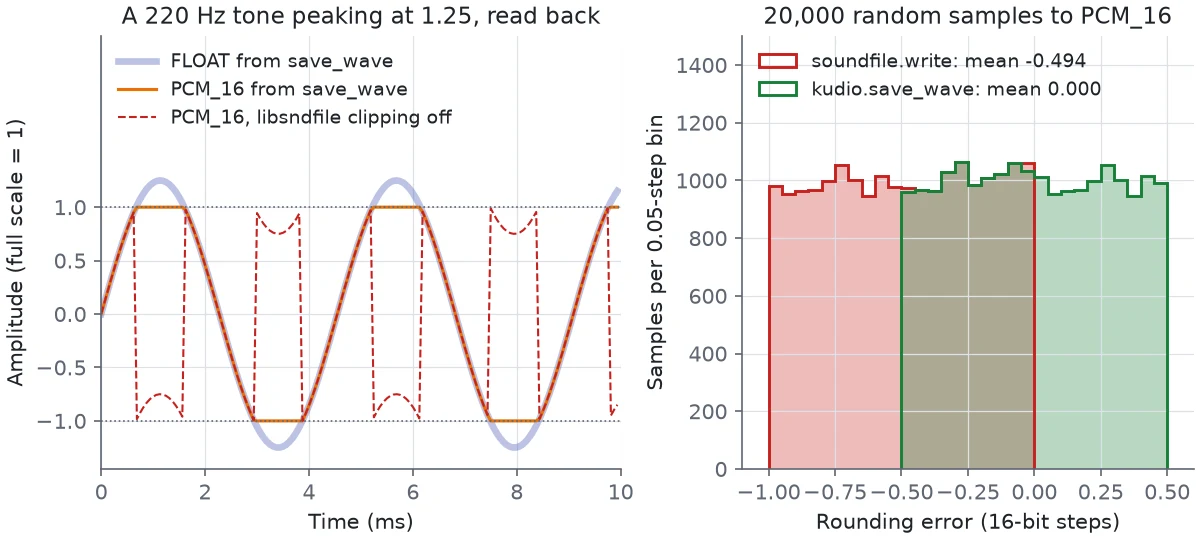
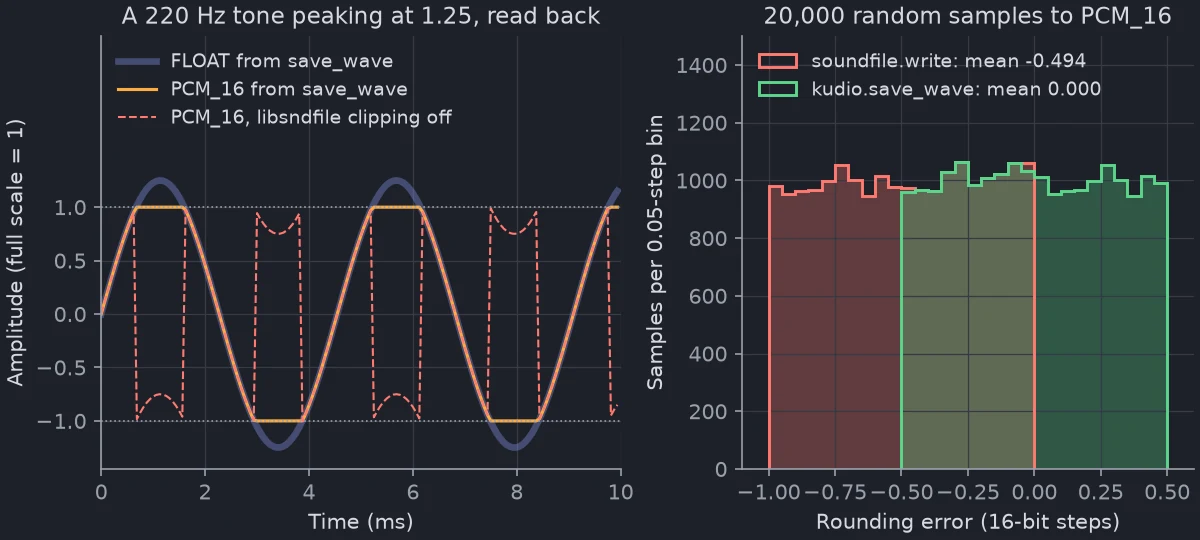
I clip every integer subtype in save_wave, and round 16-bit output myself,
instead of leaving either to libsndfile. With its clipping off, libsndfile
wraps 1.2 round to -0.8, and a tone a little too hot turns into a train of
clicks (the dashed line below); soundfile 0.14 switches clipping on, but I
would rather not depend on the release. With clipping on, the conversion
floors: through soundfile.write, 20,000 uniform random samples came back
0.494 of a 16-bit step low on average, with errors up to a full step; through
save_wave the mean error is 0.000 and none is past half a step. Every other
PCM width is rounded the same way. Through soundfile.write, PCM_24 comes
back a third of a step low on average and PCM_U8 half a step, an offset of
0.004 of full scale.
An integer array is scaled by its own type's full scale, the way soundfile
reads such a file back: int16 by 1/32768, int32 by 1/2**31, and uint8 around
its midpoint of 128, which is silence in an 8-bit file. An int16 array written
as PCM_16 survives the round trip bit for bit.
Every other function reads an integer array the same way, so an int16 array
from Recorder or scipy.io.wavfile measures
what the file it came from measures, and the loudness, a metric or a
spectrogram of it are those of the float clip. Read as plain numbers, an int16
clip measured 90.3 dB louder, 20 log10 32768. What returns float32 still does;
the editing functions and normalize_lufs hand back the input's type,
rounded and clipped at full scale.
NaN and inf
A file holding NaN or inf samples still loads, because repairing a corpus
starts with reading it, and a warning names the file and counts them. Most
measurements taken from that clip afterwards come back nan. audio_info
gives such a file, or such an array, a peak of nan with a warning, and
math.isfinite(info.peak) catches it. The loudness functions warn too, and
audio_report reports the bad samples as
its only problem (Inspecting a recording).
save_wave refuses such samples with an AudioIOError naming the file, and
writes nothing: FLOAT would keep the NaN for every later reader, and an
integer subtype would turn it into a zero that reads back as silence. The
usual source is a gain computed from a silent frame somewhere upstream.
Changing the rate in memory
y, sr = kudio.file_load("clip.wav")
y8 = kudio.resample(y, orig_sr=sr, target_sr=8000)
same = kudio.resample(y, orig_sr=sr, target_sr=sr)
print(len(y), len(y8), same is y)                 # 56000 28000 True
resample is the in-memory counterpart of
file_load(path, sr=...) and uses the same soxr_hq resampler; on a 1 s tone
the two gave identical samples. At equal rates it returns the array you passed
in, not a copy, so it is safe to call unconditionally, but copy before
changing the result in place if the original still matters.
A (frames, channels) array is resampled along its frames, so a 1 s stereo
clip at 16 kHz comes back (8000, 2) at 8 kHz, and save_wave(..., d_sample=)
does the same. An integer array comes back in its own type, rounded to the
nearest value rather than cut towards zero.
Gathering files
lists/extra.txt holds a file, a blank line and a folder:
files, rejected = kudio.check_input(["raw/", "lists/extra.txt",
"missing.wav", "notes.flac"])
for f in files:
print(f.as_posix())
print(rejected)
raw/spk1/a.wav
raw/spk1/b.wav
raw/spk2/a.wav
corpus/dr1/fcjf0/si1027.wav

corpus/dr2/fdml0/sx133.wav
['missing.wav', 'notes.flac']
check_input is how every folder tool in kudio
reads its input: files, folders (searched at any depth), .txt lists and
lists of all of these, nested as deep as you like. It returns the .wav files
it found and, separately, everything it could not use.
Relative lines in a .txt list are resolved against the working directory,
not the folder the list is in. Write them relative to the folder you run from,
usually the one holding the corpus; absolute paths only suit a list that stays
on one machine. The list is read as UTF-8, with or without a byte-order mark,
whatever the system's code page, so a list of Chinese file names written on
one machine reads the same on another.
The .wav test ignores case, the way a Windows folder search does, so a
recorder's ZOOM0001.WAV is found on Linux and macOS too, whether it is named
directly, listed or sitting in a folder.
load_waves loads everything check_input finds,
at the native rate and in mono. With std_len=True it cuts every waveform to
the shortest and refuses files at different rates:
pairs = kudio.load_waves("raw/")
print(len(pairs), pairs[0][0].shape, pairs[0][1])  # 3 (132300,) 44100
waves, sr, length = kudio.load_waves("corpus/", std_len=True)
print(len(waves), sr, length)                      # 3 16000 24000
use_pool=True loads in core_ worker processes (8 by default), but only
when there are more than 300 files. On Windows and macOS the call then has to
sit under if __name__ == "__main__":, as with any multiprocessing pool.
An entry that check_input rejects is skipped with a logged warning;
convert_folder counts it as a failure.
copied = kudio.copy_waves("picked/", "raw/")       # destination first
print([p.name for p in copied])                    # ['a.wav', 'b.wav', 'a2.wav']
copy_waves takes the destination first, the
other way round from shutil.copy, then anything check_input accepts, and
returns where each file went. Swapped round, copy_waves("raw/spk1/a.wav",
"picked/") logs that the destination is not a folder and copies nothing, as
it does for a destination with a dot in its name, such as v1.2/. Files land
flat by name, and a name already taken gets a free one from
check_file, so the second talker's a.wav
arrives as a2.wav. To copy a tree with its layout, use shutil.copytree;
convert_folder with its defaults mixes to mono and writes 16-bit, so it is
not a copy.
Converting a whole folder
raw/ holds three 44.1 kHz stereo files at three different levels.
result = kudio.convert_folder("raw/", "16k/", sr=16000, lufs=-23.0)
print(result)
for path in result.outputs:
    y, sr = kudio.file_load(path)
    print(path.as_posix(), sr, f"{kudio.loudness(y, sr):.1f} LUFS")
3/3 written, 0 failed
16k/spk1/a.wav 16000 -23.0 LUFS
16k/spk1/b.wav 16000 -23.0 LUFS
16k/spk2/a.wav 16000 -23.0 LUFS
convert_folder does the same four steps to
every file, in this order:
- load it with
file_load, atsr=if given and downmixed unlessmono=False; - trim leading and trailing silence if
trim_db=is set, passed astop_dbtotrim_silence, which cuts every channel of amono=Falsefile at the same place; - normalise to
peak=orlufs=; - write it as
subtype=,PCM_16unless you say otherwise.
The output mirrors the input tree below dst, so spk1/a.wav and
spk2/a.wav stay two files. A file that ends up with no samples is recorded
as a failure rather than written out empty. An output whose name is taken
gets a free one from check_file, so a second run
into 16k/ writes 16k/spk1/a2.wav and the rest beside the first set. The
counter has no separator, so take1.wav comes back as take12.wav. To redo a
conversion, empty dst first or pass overwrite=True. A dst inside src
is left out of the input, so a second run does not convert the first run's
output again one folder deeper.
Peak or loudness
peak=0.99 scales each file so its loudest sample sits at 0.99, the same as
normalize. lufs=-23.0 scales to an
integrated loudness measured the ITU-R BS.1770 way, through
normalize_lufs; -23 LUFS is the
EBU R 128 broadcast target. For files that will be listened to or compared I
use lufs=, because a single click sets the peak of a whole recording, and
two files with the same peak need not sound equally loud. Passing both raises
ValueError, since the second normalisation would undo the first.
Loudness is measured over 400 ms blocks, so a file shorter than 0.4 s, before
or after trimming, lands in failed with a FeatureError under lufs=;
peak= has no minimum. Digital silence is written as it is by either. And
loudness normalisation is a gain and nothing else, so a quiet file with one
loud transient can be pushed past full scale: normalize_lufs warns, and the
default PCM_16 output clips it, so write FLOAT or aim lower.
Inspecting a recording has the meters, and
Editing and effects the trimming and normalising on their own.
Lists, .txt files and root=
src can be anything check_input accepts. A
list or a .txt file is mirrored below the deepest folder its files share, so
two talkers' recordings of the same TIMIT sentence, both named sx133.wav,
stay apart:
from pathlib import Path

files = sorted(Path("corpus").rglob("sx*.wav"))
result = kudio.convert_folder(files, "corpus16k/", sr=16000)
print([path.as_posix() for path in result.outputs])
Files that all sit in one folder, such as one talker's, share that folder and
land flat in dst. To keep the layout from a higher folder, pass it as
root=: given the files in corpus/dr1/fcjf0/,
convert_folder(files, "corpus16k/", root="corpus") writes them to
corpus16k/dr1/fcjf0/. Every file has to be inside root, or ValueError
names the one that is not.
When a file fails
result = kudio.convert_folder("incoming/", "clean/")
print(result, bool(result))
print([path.name for path, reason in result.failed])
A file that cannot be read, trimmed, normalised or written does not stop the
run. It goes into the ConvertResult's
failed list as (path, reason), the reason being the exception's type and
message, and the result is falsy whenever that list is not empty.
on_error="raise" stops at the first failure instead.
What the folder tools never see
The folder tools look for .wav and nothing else. A folder of FLAC files
raises AudioIOError ("no audio files found"), and a .flac in a list is
skipped. Bring such a tree in with a loop of your own, which keeps the
channels and writes 16-bit (pass subtype="PCM_24" for 24-bit sources):
from pathlib import Path

for src in sorted(Path("flac").rglob("*.flac")):
    y, sr = kudio.file_load(src, mono=False)
    dst = Path("wav") / src.relative_to("flac").with_suffix(".wav")
    kudio.save_wave(dst, y, sr)
An entry that check_input cannot resolve, a missing path or a typo in a
list, goes into failed as "not an existing .wav file" and counts in
total, so a list with one typo in it does not come back "1/1 written".
The command line does the same with kudio convert raw/ 16k/ --rate 16000
--recursive --lufs -23, and exits 1 when any file failed
(Command line).
Picking a name that is free
takes/ already holds rec.wav, take.wav and take.v2.wav.
from pathlib import Path

for name in ["new.wav", "rec.wav", "take.v2.wav", "take.flac", "take.v2"]:
    print(name, "->", Path(kudio.check_file(Path("takes") / name)).name)
print(Path(kudio.check_file("takes/take.v2.wav", sep="_")).name)
new.wav -> new.wav
rec.wav -> rec2.wav
take.v2.wav -> take.v22.wav
take.flac -> take2.wav
take.v2 -> take.v22.wav
take.v2_2.wav
check_file always hands back a .wav name. A
suffix that is an audio container (.flac, .mp3, .ogg and so on) is
replaced, so it cannot find you a free .flac name. Anything else after a
dot, such as .v2 or .2026-10-11, is part of the name, and .wav goes on
the end. If that name is taken, a counter goes after the stem, starting above
the highest number already in the folder, and each candidate is checked
before it is handed back. With dotted or numbered names, sep="_" keeps the
counter readable.
check_file creates the parent folders but not the file, so nothing is
reserved until you write it: ask for the name right before save_wave.
rename=False hands back the taken name with a logged warning. A folder
becomes <folder>/unknown.wav, and so does a path ending in a separator that
does not exist yet: newdir/ is a folder, newdir a file name that becomes
newdir.wav.
For folders, such as one per experiment run, there is
check_path: with runs/exp and runs/exp2
already there, kudio.check_path("runs/exp") returns the string runs/exp3
(runs\exp3 on Windows). It creates nothing, and exist_ok=True hands the
path back as it is.
Clips kept by a GUI
AudioDataManager is the registry a GUI
keeps behind its clip list: each name maps to the file it came from, the
waveform as a list with one array per channel (one mono array for a file added
with add_local_file), the rate and the channel count. In a script, arrays
and save_wave are simpler.
save_all(dst_path="session/") writes every clip into that folder, a clip
named clip.quiet to session/clip.quiet.wav. Without dst_path it writes
each clip back over the file it came from, and since add_local_file keeps a
mono downmix whatever ch says, a stereo source is replaced by its
downmix. Before writing, save_all checks that no two clips
land on one file, take and take.wav for instance; if two would, it returns
False, writes nothing and logs both names. A clip with no file of its own
and no dst_path is only found when its turn comes: the clips before it are
written and save_all returns False.