Getting started
This page covers installing kudio, takes one recording from a file on disk to a cleaner file beside it, and ends with the two things that decide what you see when something goes wrong: the exceptions and the logging.
Installing
The core install brings numpy, scipy, librosa, soundfile, PyYAML, tqdm and
PyWavelets. That is enough for files, features, effects, loudness, the
reference-free report, denoising, dataset synthesis and the metrics that need
no outside package. import kudio imports none of the optional packages
below, so a missing extra shows up when you call the function that needs it
(for the plotting helpers, when you import kudio.util.visual), and not
before.
numpy is held below 2.6. The limit is numba's, not mine: librosa depends on numba, numba caps numpy, and asking pip for a newer numpy than numba accepts only gives it a problem it cannot solve. The cap moves when numba's does.
kudio needs Python 3.9 or newer. CI tests it on 3.9, 3.11 and 3.13, on Linux and on Windows.
Extras
Anything that brings in a large, compiled or niche package is an extra. Install the ones you need by name; the quotes stop shells such as zsh from reading the brackets as a file pattern:
| Extra | Installs | What it enables |
|---|---|---|
audio |
PyAudio, sounddevice | recording and playback: record, StreamRecorder, play_audio, the stream readers, list_devices |
eval |
pystoi, mir_eval below 0.9 | STOI, ESTOI and SDR in score; STOI and SDR in AudioEvaluate and eval_metrics |
pesq |
pesq | PESQ, ITU-T P.862 and P.862.2, in pesq, score and AudioEvaluate |
dnsmos |
onnxruntime | dnsmos, a predicted P.835 opinion score with no clean reference |
viz |
matplotlib | the plotting helpers in kudio.util.visual |
data |
pandas, openpyxl | AudioEvaluate.get_df and per_file, data2xlsx |
all |
audio, eval, dnsmos, viz, data |
every runtime extra except pesq |
[dev], [check] and [docs] are for working on kudio rather than with it,
and [all] leaves them out as well. Four of the others have a catch:
pesq- The
pesqpackage is on PyPI as source only, so installing it compiles C code and needs a compiler: on Windows, the MSVC Build Tools. I keep it out of[eval]and[all]so that those two still install on a machine without one. dnsmos- This installs the runtime, not the model. The weights belong to
Microsoft's DNS-Challenge and are distributed there, so clone that
repository and pass its DNSMOS folder as
model_dir=, or set theKUDIO_DNSMOS_DIRenvironment variable to it. When kudio finds nosig_bak_ovr.onnxit raises aFeatureErrorsaying where to get it. audio- Two PortAudio bindings, because kudio uses both:
recordandlist_devicesrun on sounddevice, the streaming classes on PyAudio, and the two number devices independently (Recording and live views). PyAudio publishes wheels for Windows only, so elsewhere pip builds it from source, which takes a C compiler, the Python headers and PortAudio's:portaudio19-devandpython3-devon Debian and Ubuntu,brew install portaudioand the Xcode command-line tools on macOS. On Linux, sounddevice also needs the system's PortAudio library. eval- mir_eval stays below 0.9 because SDR calls its
bss_eval_sources, which 0.8 deprecates and says 0.9 will remove. kudio keeps that notice to itself, since the pin already deals with it and there is nothing for a caller to change.
check_metrics_install says
which metric back-ends a machine has; Measuring quality
has what it returns.
A first session
The session takes one noisy recording through the usual steps: look at the file, load it, check it, denoise it, score the result against the clean signal and save it. It needs nothing beyond the core install, and two files you can make yourself: a clean signal of two voiced stretches with pauses around them, and the same signal with white noise mixed in at 2 dB SNR.
These are not the files from the tour on the home page, although the names are the same. Run the block in an empty folder, or none of the numbers below will match.
Making clean.wav and noisy.wav
import numpy as np

import kudio

sr = 16000
t = np.arange(int(4.5 * sr)) / sr


def syllables(start, stop, f0):
    """Harmonics of f0 under a 4 Hz syllable envelope, between two times."""
    inside = (t >= start) & (t < stop)
    tone = sum(np.sin(2 * np.pi * f0 * k * t) / k for k in range(1, 12))
    envelope = 0.5 - 0.5 * np.cos(2 * np.pi * 4 * (t - start))
    return np.where(inside, tone * envelope / 5, 0.0)


clean = (syllables(0.5, 1.75, 120) + syllables(2.5, 4.0, 150)).astype(np.float32)
noise = np.random.default_rng(0).standard_normal(len(t)).astype(np.float32)
noisy = kudio.add_noise_snr(clean, noise, snr_db=2, seed=0)

kudio.save_wave("clean.wav", clean, sr)
kudio.save_wave("noisy.wav", noisy, sr)
add_noise_snr scales the noise
to the SNR you ask for, with the speech power averaged over the whole
clip, pauses included.
Look, then load
import kudio

print(kudio.audio_info("noisy.wav"))
y, sr = kudio.file_load("noisy.wav")
print(y.dtype, y.shape, sr)
audio_info answers rate, channels, length and
encoding from the header. The peak needs the samples, which it reads in
blocks; peak=False skips them and stays instant on a file of any size.
file_load returns float32 at the file's own rate,
or at sr= if you pass one. A multi-channel file is mixed to mono unless you
pass mono=False, and then comes back channels last, (frames, channels),
with or without sr=.
Check it
4.50s @ 16000 Hz · peak -5.3 dBFS · -18.4 LUFS · SNR~9 dB · bandwidth 8000 Hz
estimated SNR around 9 dB — the noise floor is close to the content
audio_report needs no clean reference. It
measures level, loudness, clipping, DC offset, silence, the noise floor and
how much of the band the content really uses, and
problems puts whatever is worth
acting on into sentences. An empty list means nothing it can measure is
wrong. The loudness is gated integrated loudness to ITU-R BS.1770, the number
loudness returns on its own: how loud the
clip sounds, which the peak cannot tell you.
Inspecting a recording has the rest of the loudness
tools.
The file was mixed at 2 dB and the report says 9. Both are right about different things. The mix SNR averages the speech over the whole file, pauses included; the report cuts the file into 30 ms frames and compares the loud ones (95th percentile of their levels) with the quiet ones (10th percentile). Use it to spot a noisy file, not to quote a number. The figure in the next step marks both percentiles.
Denoise
spectral_enhance defaults to a
log-MMSE gain over an MCRA noise estimate, and returns exactly as many samples
as it was given, so the output lines up with the input sample for sample.
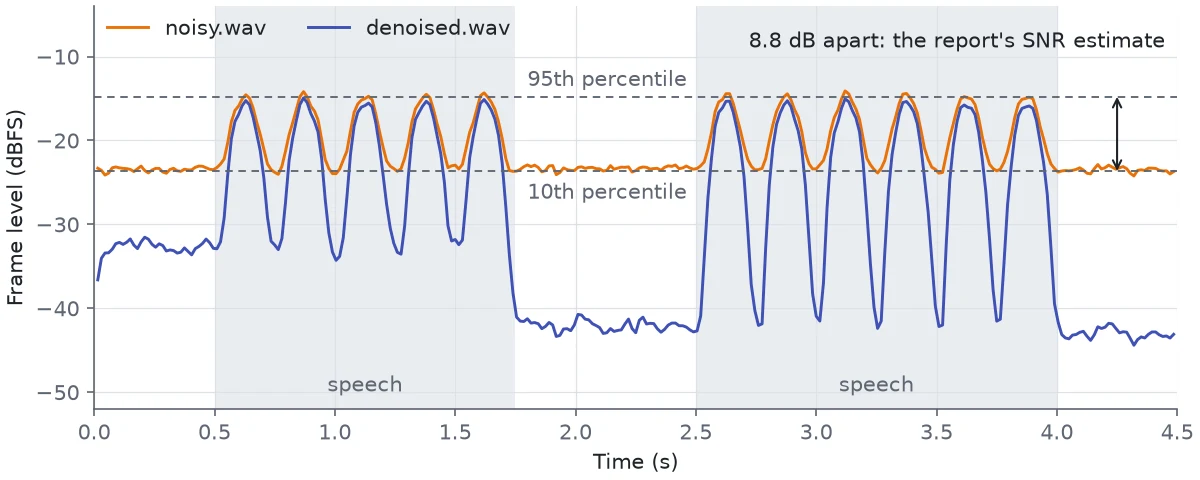
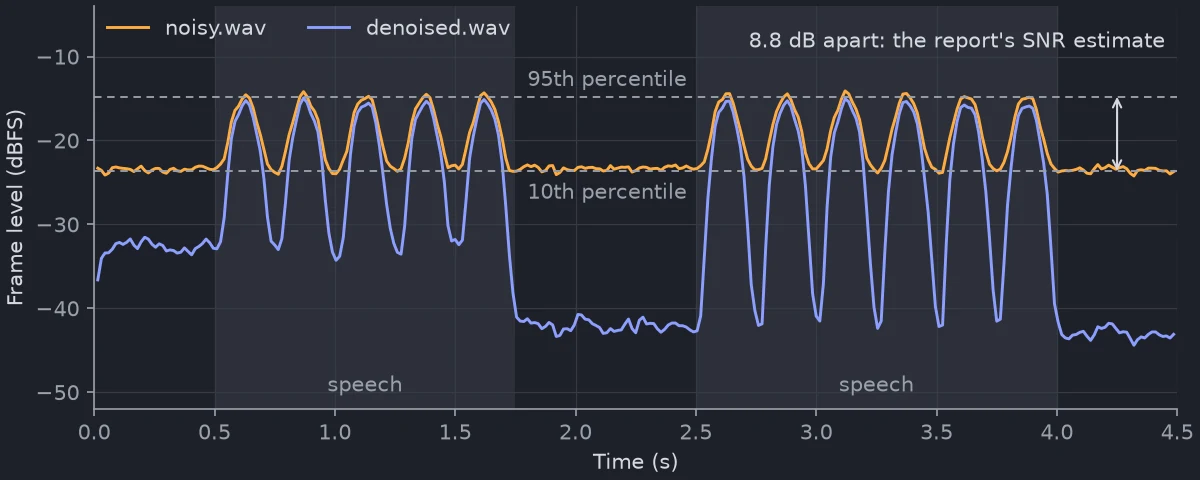
noisy.wav is what the report measured: each syllable peaks at about
-14.5 dBFS and the pauses sit at the noise floor, -23.6 dBFS. denoised.wav
is the output of the call above. Its noise floor is 19 dB lower, at
-42.8 dBFS, which is where the two later pauses sit. The syllable peaks drop by only
about 1 dB, because at a peak the level is the speech's own. The noise under
the speech goes down as well, but by less: over the two voiced stretches, the
difference from clean.wav falls from -23.5 to -31.4 dBFS. The method can
only take away what it can tell apart from the speech.
The first half second keeps about 10 dB more noise than the later pauses.
MCRA learns the noise as it goes and is still learning there. This clip opens
on half a second of noise alone, which suits the initial estimator: it takes
the opening frames as room tone and keeps that estimate.
That leaves all three pauses at about -38 dBFS, the first one 6 dB quieter than with MCRA and the later two 4 to 5 dB louder, and the SI-SDR in the next step goes from 11.04 to 12.38 dB. The seven gain rules, the four noise estimators and how to compare them are on Denoising. That page also measures where denoising stops paying. This clip still gains 8 dB of SI-SDR when it is mixed at 30 dB instead of 2, but the voices there gain less the cleaner the input is, and at 20 dB all seven gain rules leave them worse than they found them.
Score against the clean signal
ref, _ = kudio.file_load("clean.wav")
before = kudio.score(ref, y, sr, ["snr", "si_sdr", "segsnr"])
after = kudio.score(ref, denoised, sr, ["snr", "si_sdr", "segsnr"])
for name in before:
    print(f"{name:7s} {before[name]:6.2f} -> {after[name]:6.2f} dB")
score takes metrics by name: snr, si_sdr,
segsnr and sdi need nothing installed, the rest need the extras above.
With no list it runs every metric that can run on this machine.
These numbers need the clean signal, which a mix you made yourself has and a
real recording never does; that is what audio_report is for. They also
compare sample i with sample i, so a pair that may be shifted needs
align first. Shifted by 16 samples (1 ms), the
denoised clip scores -9.43 dB SI-SDR instead of 11.04.
Measuring quality has the rest.
Save
save_wave writes 16-bit PCM unless you pass
another subtype=, creates missing folders, clips anything past ±1.0 in the
integer formats and refuses NaN or inf with an AudioIOError.
Audio files has the formats and the reasons.
The denoised file measures -21.6 LUFS against the noisy file's -18.4: the
noise it removed was part of the level. Bring the two to the same loudness
with match_loudness before you listen
to them side by side; Inspecting a recording explains
why.
The same from a shell
kudio info noisy.wav
kudio report noisy.wav                    # exit status 1: it found a problem
kudio enhance noisy.wav denoised.wav
report exits with 1 when problems() is not empty, so it works as a test
in a shell script. Every command is on Command line.
Errors
kudio's own exception classes all derive from
KudioError:
| Class | Raised when |
|---|---|
AudioIOError |
a file cannot be read or written: file_load, audio_info, save_wave and what is built on them |
FeatureError |
a transform or measurement refuses its input: wrong shape, too short, an unknown method or parameter |
DeviceError |
StreamRecorder finds no usable input device, or sounddevice is installed but the system has no PortAudio library |
SynthesisError |
Synthesizer will not empty a folder holding its inputs, the working directory, your home directory or a filesystem root, or meets a silent noise or clean file it cannot set an SNR with |
DependencyError |
an optional package is missing; it is an ImportError as well |
Nothing in kudio raises
UnsupportedFormatError, a
subclass of AudioIOError. A file soundfile cannot read comes back as
AudioIOError itself, so catch that, for example to skip the unreadable files
in a batch:
for path in ["noisy.wav", "missing.wav"]:
    try:
        y, sr = kudio.file_load(path)
    except kudio.AudioIOError:
        print("skipped", path)
The message names the file and carries soundfile's reason, and soundfile's own
exception is chained as __cause__, so a traceback shows both.
A DependencyError names the extra to install, and keeps the package and the
extra as attributes. On a machine without [pesq]:
try:
    kudio.score(ref, denoised, sr, ["pesq"])
except kudio.DependencyError as e:
    print(e)
    print(e.extra)
score raises here because PESQ was asked for by name. Called without a
list, it leaves out what is not installed, and eval_metrics returns None
in its place.
Three kinds of failure fall outside KudioError, or only partly inside it:
- Many argument checks, and a few checks on the data, raise the built-in
ValueErrororTypeError: an unknown metric name inscore, two signals too different in length to score, a stereo pair handed to a metric, a sample rate of 0 inresampleorfile_load, a string whereSynthesizerexpects a list of SNRs, a clean folder with no.wavfile in it. ASynthesizerinput that does not exist raisesFileNotFoundError.except kudio.KudioErrorcatches none of these. - A buffer that waited longer than its
timeout=raises the built-inTimeoutError(Recording and live views). play_audiodoes not raise when it cannot play something, a missing file included. It returns a short message saying what went wrong, andNonewhen it played, so check what it returns. A missing PyAudio or sounddevice is the exception: that is aDependencyError, as it is for the rest of live audio.
Logging
kudio logs through the standard logging module, to loggers named after its
modules (kudio.core.loudness, kudio.core.synth and so on), all below
kudio. That logger carries a NullHandler and nothing else, so until your
program configures logging, nothing kudio logs is printed, not even at
WARNING level.
What goes into the log is bookkeeping: nothing is wrong with the audio, but
you may want a record of it. Asking check_file
for a name that is taken, without letting it rename, is one:
import logging

logging.basicConfig(level=logging.WARNING)
path = kudio.check_file("noisy.wav", rename=False)
Without the basicConfig line the same call prints nothing. The same goes
for Synthesizer.syn() emptying an output folder that already holds files, a
list entry that load_waves or copy_waves passed over, a metric back-end
that eval_metrics left out, and a pair that align found polarity-inverted.
I would turn logging on at WARNING in anything that builds a dataset. With
basicConfig in place, this adds kudio's INFO messages without everyone
else's:
The kudio command configures logging itself, INFO by default and DEBUG
with -v; Command line says where the flag goes.
Two kinds of output do not go through logging at all:
- Progress bars. The batch helpers (
Synthesizer.syn,AudioEvaluate.eval,mfcc_from_files,logspec_from_files,load_waves,copy_waves,map_waves) draw tqdm bars on stderr. The environment variableTQDM_DISABLE=1turns them off. tqdm reads it from 4.66 on, and kudio accepts 4.60, so upgrade tqdm if the variable does nothing. - Python warnings. A
UserWarningis for something wrong with the audio or the result, which you should see with logging off: a file or array with NaN or inf samples in it,normalize_lufspushing a clip past full scale,scorecutting two signals to a common length, a clip too short for STOI,Synthesizerwriting a mixture past full scale or finding its output folder full withoverwrite=False,split_pairsdropping repeated rows. ADeprecationWarningmarks an old name, and Migrating from v2 lists them.
Where to go from here
| If you have | Read |
|---|---|
| a folder of recordings to convert, check or normalise | Audio files, Inspecting a recording |
| a model that needs features | STFT and features |
| speech to find, or a pitch to track | Speech activity and pitch |
| a clip to cut, filter or augment | Editing and effects |
| clean speech and noise, and want a training set | Building a noisy dataset, Rooms and channels |
| noisy recordings to clean up, or a denoiser to judge | Denoising, Measuring quality |
| a microphone | Recording and live views |
| a function, and want every parameter | API reference |