Editing and effects
kudio.effects is what an audio editor does to a waveform, written as
functions: fades, filters, cuts and joins, trimming, level, and the
augmentations that turn one recording into several for training. Each one
takes a NumPy array and returns a new one: none of them writes into the array
you pass in or hands it back, so a result can be changed in place safely.
The channel degradations (telephone,
dropouts and the G.711 companders) live in
the same package and have their own page, Rooms and channels.
| To do this | Use |
|---|---|
| stop a clip starting or ending on a click | fade |
| take out rumble, hum, or everything outside a band | highpass, lowpass, bandpass, bandstop |
| take out a constant offset | remove_dc |
| cut a span out, or patch one in | splice |
| drop the silence around a studio take or a transient | trim_silence, split_on_silence |
| find the speech in a recording with a noise floor | vad, on Speech activity and pitch |
| cut a recording where a label file says | load_labels |
| set the peak | normalize, normalize_db |
| set how loud it sounds | normalize_lufs, on Inspecting a recording |
| get more training data out of one clip | pitch_shift, time_stretch, add_noise_snr, reverb, spec_augment |
The files used on this page
take.wav is six seconds of white noise at 0.01 RMS, standing in for a
room, with two voiced phrases in it: 1.0 to 2.0 s and 3.5 to 4.8 s.
retake.wav is a 0.3 s phrase to patch in, stereo.wav the take on two
channels, and take.txt an Audacity label track marking the phrases.
import numpy as np
import kudio

sr = 16000

def voiced(seconds, f0):
    t = np.arange(int(seconds * sr)) / sr
    return sum(np.sin(2 * np.pi * f0 * k * t) / k for k in range(1, 12)) / 6

y = 0.01 * np.random.default_rng(0).standard_normal(6 * sr)    # the room
y[1 * sr:2 * sr] += voiced(1.0, 120)
y[int(3.5 * sr):int(4.8 * sr)] += voiced(1.3, 150)
kudio.save_wave("take.wav", y.astype(np.float32), sr)
kudio.save_wave("retake.wav", (0.5 * voiced(0.3, 130)).astype(np.float32), sr)
kudio.save_wave("stereo.wav", np.stack([y, 0.5 * y], axis=1).astype(np.float32), sr)
kudio.save_labels("take.txt", [kudio.Label(0.93, 2.07, "speech"),     # the spans
                               kudio.Label(3.43, 4.87, "speech")])    # vad finds
Channels and sample rates
Anything that works in seconds takes the sample rate as sr. The fades,
reverse,
remove_dc,
crossfade and
splice take a mono (n,) clip or a
(frames, channels) one, and do the same thing to every channel. So do
normalize,
normalize_db,
gain and
random_gain, with one gain for all
channels; looping normalize over the channels would bring each to its own
peak and change the balance.
The filters, pitch_shift,
time_stretch and
reverb take a (frames, channels) array too
and work along its frames, each channel on its own. The silence functions cut
every channel at the same samples, and count a frame as sound when any channel
is, so a stereo take stays in step:
import kudio

y, sr = kudio.file_load("stereo.wav", mono=False)        # (frames, 2)
y = kudio.highpass(y, sr)                                # each channel
clip, (start, end) = kudio.trim_silence(y)               # one cut for both
add_noise_snr mixes mono signals and
refuses anything else. Called per channel with one noise and one seed, it puts
the same noise into every channel; give each channel noise of its own if they
should differ.
splice and crossfade use sr only to turn duration into samples and do
not check that the parts share a rate, so load every part at one rate.
resample works along the frames of a stereo array
as well; Audio files has more on rates.
Fades
import kudio

y, sr = kudio.file_load("take.wav")
y = kudio.fade(y, sr, fade_in_s=0.01, fade_out_s=0.01)
A clip cut out of a longer recording starts and stops mid-waveform, which is a
step, and a step is a click. The 10 ms default at each end is long enough to
remove it and too short to be heard as a fade.
fade_in and
fade_out do one end each.
shape= |
The curve | Where it fits |
|---|---|---|
'linear' (default) |
a straight ramp in amplitude | anti-click fades, too short for the shape to matter |
'cosine' |
a raised cosine, flat at both ends | audible fades, which then neither start nor stop abruptly |
'exponential' |
straight in decibels from −60 dB, rescaled to end exactly at 0 and 1 | slow fade-outs, which sound even when they are even in dB |
A fade longer than the clip raises
FeatureError, and so do a fade-in and a
fade-out that overlap, rather than multiplying the middle by both ramps.
DC offset
remove_dc subtracts each channel's mean. A
constant offset costs headroom and thumps at every cut. It can also stop
trim_silence from trimming anything
(see below). An offset that drifts is a
very low frequency rather than an offset, and remove_dc only takes out its
average. A highpass takes the rest:
import numpy as np
import kudio

sr = 16000
t = np.arange(4 * sr) / sr
y = 0.3 * np.sin(2 * np.pi * 200 * t) + 0.025 * t     # drifts from 0 to 0.1

for fixed in (kudio.remove_dc(y), kudio.highpass(y, sr, cutoff=20)):
    print(f"{fixed[:sr].mean():+.4f} {fixed[-sr:].mean():+.4f}")
# -0.0375 +0.0375      remove_dc: mean of the first and last second
# +0.0006 +0.0003      highpass
Filters
import kudio

y, sr = kudio.file_load("take.wav")
y = kudio.highpass(y, sr, cutoff=80)       # rumble, handling noise
y = kudio.bandstop(y, sr, 45, 55)          # 50 Hz hum; (55, 65) for 60 Hz
y = kudio.lowpass(y, sr, cutoff=7000)      # hiss
All four are Butterworth filters, fourth order unless you pass order=.
| Function | Default | Chosen for |
|---|---|---|
highpass |
removes below 80 Hz | rumble, handling noise, slow drift |
lowpass |
removes above 8000 Hz | hiss, and anything above the band of a model trained at 16 kHz |
bandpass |
keeps 300–3400 Hz | the telephone band |
bandstop |
removes 45–55 Hz | 50 Hz mains hum |
A lowpass at or above Nyquist
The 8000 Hz default is the Nyquist frequency of 16 kHz audio and lies
above it at 8 and 11.025 kHz. There is nothing up there to remove, so
lowpass hands the clip back unchanged, as a copy. The other filters'
edges have to sit strictly between 0 and Nyquist, and band edges given
the wrong way round are refused.
Zero-phase by default
The filters run forwards over the clip and then backwards (scipy's
sosfiltfilt). The backward pass undoes the phase shift of the forward one, so
nothing moves in time and the filtered copy lines up sample for sample with the
original. Anything compared with the original sample by sample needs that, such
as a training target filtered separately from its input.
Running the filter twice also squares its magnitude response. The slope is that of a filter of twice the order, and at the cutoff the signal is 6 dB down instead of the 3 dB a Butterworth is usually quoted at:
import numpy as np
import kudio

sr = 16000
tone = np.sin(2 * np.pi * 1000 * np.arange(2 * sr) / sr)     # at the cutoff
middle = slice(sr // 2, 3 * sr // 2)                         # away from the ends

for zero_phase in (True, False):
    out = kudio.lowpass(tone, sr, cutoff=1000, zero_phase=zero_phase)
    gain_db = 20 * np.log10(np.std(out[middle]) / np.std(tone[middle]))
    print(f"zero_phase={zero_phase}: {gain_db:.2f} dB")
# zero_phase=True: -6.02 dB
# zero_phase=False: -3.01 dB
zero_phase=False gives the causal filter, one pass, the way a device running
live would filter. It delays each frequency by a different amount: the default
highpass holds 100 Hz back by 4.8 ms and 1 kHz by 0.03 ms. Use it to imitate
processing that will run in real time.
Short selections filter as well: the padding sosfiltfilt adds at both ends
shrinks to fit, and only a single sample is refused.
wavelet_low_pass_filter
in kudio.enhance is a denoiser that happens to be low-pass, and it is no
substitute for these; the denoisers are on Denoising.
Cutting and joining
Cut a span out of a recording and butt the two sides together with
np.concatenate, and the waveform jumps at the seam.
splice blends the last 5 ms of each part into the
first 5 ms of the next instead.
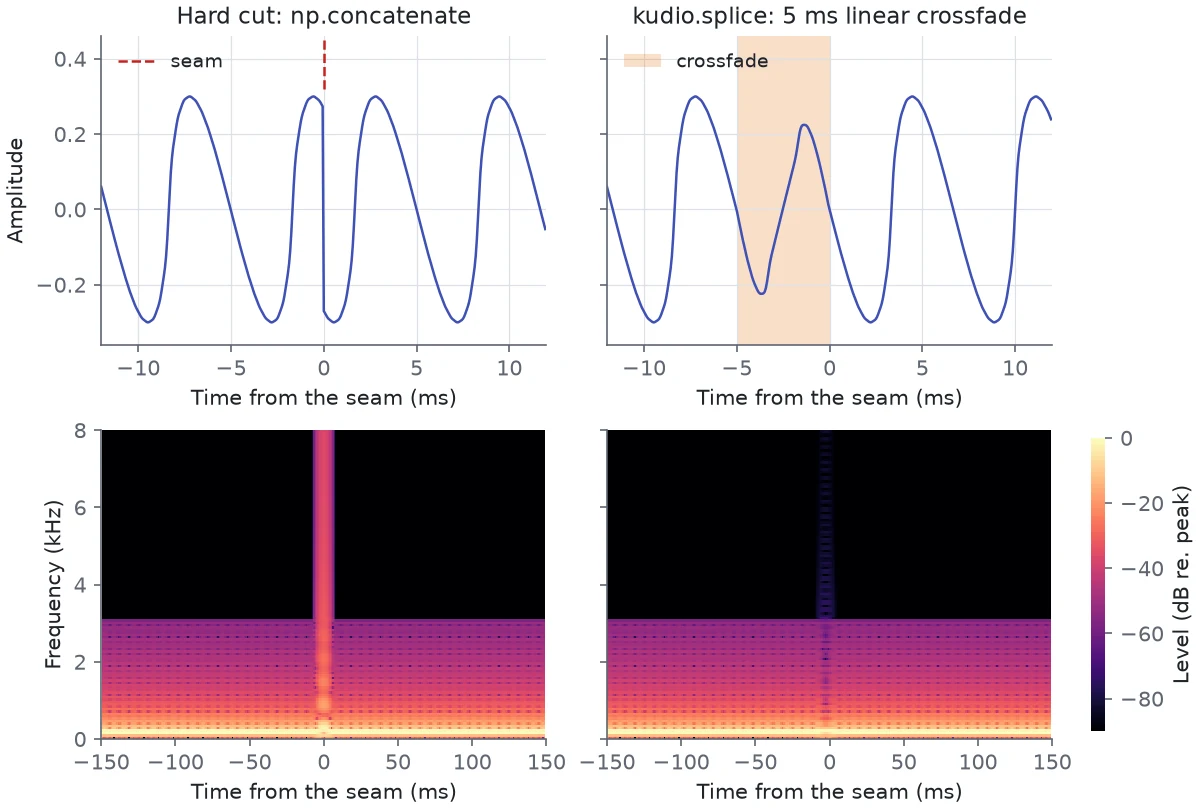
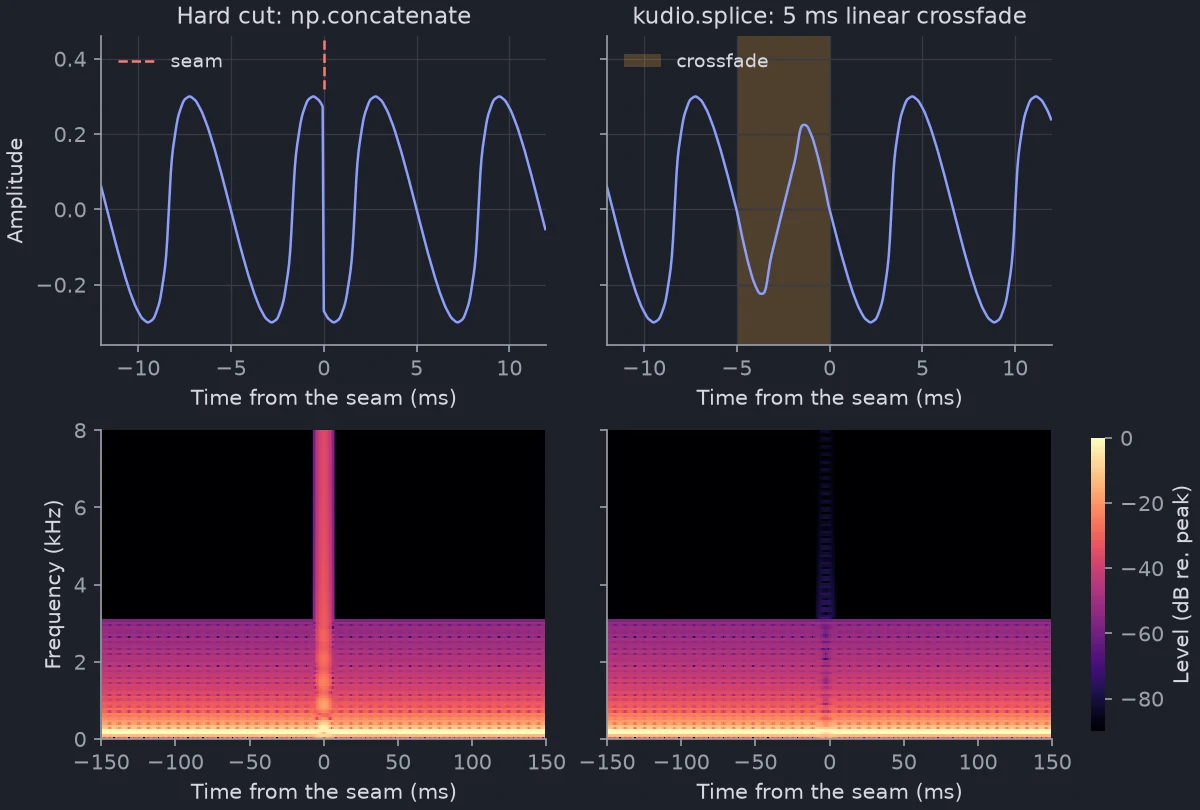
The figure deletes 6.5 periods from a 150 Hz tone with harmonics up to 3 kHz, so the two sides meet half a period out of step. Butted together, the waveform jumps by 0.54 between two samples, nearly nine times the largest step anywhere else in the tone, and the spectrogram shows the click as a stripe all the way to 8 kHz. Above 4 kHz, where the tone has nothing, it reaches −33 dB relative to the peak. Across the spliced seam that band stays under −77 dB. The crossfade does not hide that the two sides were out of step: for those 5 ms they partly cancel, which is a dip in level rather than a click.
import kudio

y, sr = kudio.file_load("take.wav")
retake, _ = kudio.file_load("retake.wav", sr=sr)    # at the take's rate
a, b = int(1.20 * sr), int(1.45 * sr)               # a cough, say

fixed = kudio.splice([y[:a], y[b:]], sr)                 # cut it out
patched = kudio.splice([y[:a], retake, y[b:]], sr)       # or replace it

print(len(y) - (b - a) - len(fixed))           # 80, at 16 kHz
The result is shorter than its parts by duration per seam:
DEFAULT_CROSSFADE, 5 ms or 80 samples
at 16 kHz, unless you pass another. The overlap is shared, not inserted.
Everything after a seam lands that much earlier than plain concatenation would
put it, so labels or a reference kept in step with the audio have to move with
it.
Empty parts are skipped, so a cut at the very start or end leaves no seam with nothing on one side, and a crossfade longer than a part shrinks to fit it.
Linear or equal-power
crossfade joins two clips through one seam,
and defaults to shape='equal_power' where splice defaults to 'linear'.
splice is meant for two moments of one recording, crossfade for two
different recordings. In the middle of the seam a linear crossfade weights
each side by 0.5 and an equal-power one by 0.71, so:
| Either side of the seam | linear | equal-power |
|---|---|---|
| the same signal carrying on | level unchanged | up to 3 dB louder mid-seam |
| two unrelated signals | 3 dB down mid-seam | level unchanged |
How much of the 3 dB shows depends on how the overlapping ends line up. A 0.5-amplitude sine cut in two and joined back through the 5 ms default peaked at 0.567 under equal-power at 440 Hz, and at 0.695 at 400 Hz, where the 80 overlapping samples are exactly two periods and fall in phase. Linear left it at 0.500 both times.
Trimming and splitting on silence
trim_silence cuts the silence off both
ends and returns the clip with the sample range it kept.
split_on_silence cuts at every
silent gap and returns the pieces, without their positions.
Both decide on level alone. A frame counts as silent when its RMS is top_db
(30 by default) or more below the loudest frame's. Frames are frame_length=2048
samples with a hop of hop_length=512, counted in samples rather than seconds:
128 ms and 32 ms at 16 kHz. The boundaries land on the hop grid and lean
outwards, so a trimmed clip keeps a little of the silence on each side:
import numpy as np
import kudio

sr = 16000
tone = 0.5 * np.sin(2 * np.pi * 440 * np.arange(sr // 2) / sr)
y = np.concatenate([np.zeros(sr // 2), tone, np.zeros(sr // 2)]).astype(np.float32)

for clip in (y, y + 0.02, kudio.remove_dc(y + 0.02)):
    _, (start, end) = kudio.trim_silence(clip, top_db=30)
    print(start / sr, end / sr)
# 0.448 1.088      the tone runs from 0.5 to 1.0 s
# 0.0 1.5          a DC offset of 0.02: nothing trimmed
# 0.448 1.088
An offset of 0.02 sits 25 dB under the tone's RMS, inside the 30 dB window,
so every frame of the "silence" counts as sound. Run
remove_dc first.
kudio trim in.wav out.wav --top-db 30 does the trim from a shell, on a mono
mix of the file; see Command line.
When the background is not silent
Level relative to the loudest frame works where the gaps are far quieter than
the sound, as in a studio take or around a knock in a still room. In
take.wav the room sits about 23 dB under the loudest frame, so
at the default top_db=30 every frame counts as sound and split_on_silence
returns the whole file as one piece. Lowering top_db until the room drops out
(23 does it here) also cuts into the quiet ends of words, which sit near the
room's level. For speech, vad,
vad_split and vad_trim
measure level against the recording's own noise floor and check that a loud
frame looks like a voice. Speech activity and pitch runs both
approaches on the same recording.
Cutting at labels
A Label is a named span in seconds, and
save_labels writes a list of them as an
Audacity label track, where the spans can be checked and moved by hand;
Speech activity and pitch makes labels from vad and f0 and
describes both file formats. To cut a recording where a label file says, read
it back with load_labels:
import kudio

y, sr = kudio.file_load("take.wav")
for label in kudio.load_labels("take.txt"):
    clip = y[round(label.start * sr):round(label.end * sr)]
    print(label.text, round(label.duration, 2), len(clip))
# speech 1.14 18240
# speech 1.44 23040
Convert seconds to samples with round, not int: 2.01 * 16000 comes out
as 32159.999…, which int makes 32159, one sample short.
A track exported from Audacity reads back the same way. A label with a
frequency range gets a second row from Audacity, starting with a backslash;
load_labels skips it, since a Label holds times only.
Level
normalize and
normalize_db set the peak, as a
fraction of full scale or in dBFS, and leave a silent clip unchanged instead of
dividing by zero. gain and
random_gain change the level by a fixed
or a seeded random number of dB. All four keep the input's dtype. Integer
audio is scaled on its own full scale and rounded, and a gain that runs past
full scale clips there rather than wrapping round. The filters, fades,
crossfades, remove_dc, time_stretch and pitch_shift treat integer audio
the same way: a filter's overshoot or the 3 dB an equal-power seam adds is held
at full scale instead of wrapping round to the other sign.
The peak says nothing about how loud a clip sounds, since one stray click sets
it. To make clips sound equally loud, use
normalize_lufs, which measures loudness
to ITU-R BS.1770-4; Inspecting a recording shows the
difference on a clip with one click in it.
Augmentation
These change a recording on purpose, to get more training examples out of it.
Those with anything random in them take a seed, and the same seed returns the
same array; pitch_shift, time_stretch and reverb have nothing random in
them.
Pitch and tempo
pitch_shift moves the pitch by n_steps
semitones and keeps the length;
time_stretch changes the length by
rate (above 1 is faster) and keeps the pitch. Both come from librosa. On a
second of a 200 Hz harmonic tone that f0 reads as
200.5 Hz, n_steps=2 gives 225.0 Hz in the same 16000 samples (two semitones
up is 225.1), and rate=1.25 gives 12800 samples still at 200.5 Hz.
Noise at a set SNR
add_noise_snr mixes noise into y
at snr_db. Noise shorter than the clip is tiled; longer noise is cropped at a
random offset, and that offset is the only random thing in it, so seed only
matters when the noise is longer. The noise's mean is removed before it is
scaled, so noise that is silent or constant over the stretch used would leave
nothing to scale and hand back y untouched at any SNR; it raises
FeatureError instead. Both signals are mono, and a stereo array is refused
rather than mixed along the wrong axis. Integer audio is mixed on its own full
scale and comes back in its own type, rounded and clipped.
import numpy as np
import kudio

sr = 16000
y = (0.3 * np.sin(2 * np.pi * 220 * np.arange(2 * sr) / sr)).astype(np.float32)
noise = np.random.default_rng(0).standard_normal(10 * sr).astype(np.float32)

mix = kudio.add_noise_snr(y, noise, snr_db=5, seed=0)
print(round(kudio.snr(y, mix), 2))                                     # 5.0
print(np.array_equal(mix, kudio.add_noise_snr(y, noise, 5, seed=0)))   # True
The SNR is measured over the whole clip, pauses included. Mix a clip that is
half silence at 5 dB, and the half with sound in it sits 3 dB higher, at about
8 dB, because the silent half halves the clip's average signal power. For a
whole corpus, Synthesizer does the mixing
with a seed per file and writes down what came from what; see
Building a noisy dataset.
Reverb
reverb is a comb filter: the clip and seven
echoes of it, delay_ms apart (50 ms by default), each decay times the one
before (0.3 by default, 10.5 dB quieter). The output is as long as the input,
so the echoes that would ring past its end, up to 350 ms at the defaults, are
cut off, and it is scaled so its peak matches the input's peak. It sounds like
a repeating echo rather than a room: rt60 reads a T30
of 0.32 s off its impulse response and adds that the decay is not straight.
When the augmentation should sound like a room, or you need to say which room,
use rir and apply_rir,
on Rooms and channels.
SpecAugment
spec_augment blanks out random bands of
a spectrogram: up to freq_mask_width bins (8) and up to time_mask_width
frames (16), one band of each by default. Each width is drawn from 0 up to the
maximum, so a mask can come out empty.
It reads the spectrogram as (frames, bins), the layout of kudio's own
spectrograms from
waveform_to_spectrogram and
STFT.forward:
import kudio

y, sr = kudio.file_load("take.wav")
spec = kudio.waveform_to_spectrogram(y)                  # (frames, bins)
masked = kudio.spec_augment(spec, seed=0)                # the default widths
A masked cell takes the spectrogram's mean, which is what the SpecAugment
paper does: it normalises to zero mean and masks with zero1.
Masking unnormalised log10 power with zero instead would mean a power of 1
whatever the clip, brighter than nearly everything it covers, so the mean is
the default; pass mask_value= for another value.
Where the parameters are
Every parameter of every function here is in the API reference, under
Editing and effects; Label and the label files
are under Datasets.
-
D. S. Park et al., "SpecAugment: A Simple Data Augmentation Method for Automatic Speech Recognition", Interspeech 2019. ↩