Manifest
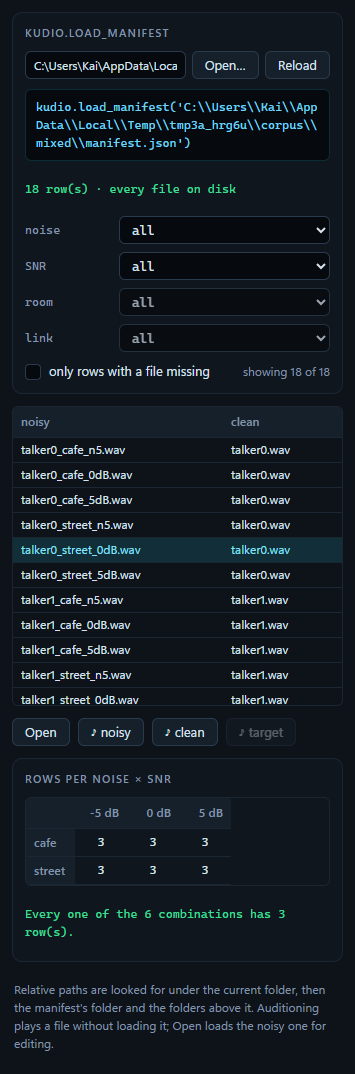
A synthesised corpus is thousands of files whose names carry the clean file,
the noise and the SNR. The room, the link and the reverberant target are in
none of them. They are only in the manifest.json the
Synthesize panel writes beside every corpus, and this panel
reads one back with kudio.load_manifest, the call under the path, as what it
is: rows of noisy, clean, noise, SNR, room, link and target.
Two questions are worth asking before anything is trained on a corpus, and the panel answers both: is every file still there, and is the noise × SNR grid covered?
Opening one
- File → Open manifest…, or Open… in the panel itself.
- On the command line,
kudiostudio data/mixed/manifest.json. A.jsonamong the files named there opens in this panel; with several, the last one does. - A
.jsondropped on the window, or picked in File → Open…, comes here as well, rather than failing as a file that is not audio.
Reading the manifest and looking for every file it names run in the background, so a corpus of tens of thousands of rows does not freeze the window. The status line says when the table is ready and how many rows it holds. Reload reads the manifest again and looks for every file again: after a synthesis run has written it again, say, or a folder has been moved back.
The table
| Column | From the manifest |
|---|---|
| noisy | noisy: the mixture |
| clean | clean: the clean file it was made from |
| noise | noise: the name of the noise file |
| SNR dB | snr_db |
| RT60 s | rt60: the room |
| link | channel |
| target | target: the reverberant target |
A dash is a value the row does not have: no room, no link, no target.
The folder that every path of one kind shares is left off, so the noisy column
reads u0_babble_n5_rt300ms.wav instead of the same long prefix ten thousand
times. The column header's tooltip names that folder, and a cell's tooltip
gives the full path of its file. A name too long for its column loses its
middle: a synthesised name starts with the clean file and ends with the SNR
and the room, and those are the parts worth keeping. The table is wider than
the panel, so the columns after clean are a sideways scroll away.
The table builds only the rows in view and fetches more as you scroll.
Sorting
Click a column header to sort by it, ascending (▲); click again for descending (▼), and a third time for the manifest's own order. SNR and RT60 sort by value. As text, "10" would come before "5", and "−5" would land wherever the minus sign put it. Rows with no value go last whichever way the column is turned, and rows that tie keep the order the corpus was written in.
Filters
noise, SNR, room and link each show all the rows or only those
with one value. none is a value in its own right: the rows with no room, or
with no link. A filter whose column holds one value only is greyed out.
only rows with a file missing keeps just those rows, and the line beside it
says how many rows are shown out of how many.
Opening a row and listening to it
Click a row to select it; Up and Down move through the table. Open, a double-click or Enter loads the row's noisy file into the session for editing, as File → Open… would.
♪ noisy, ♪ clean and ♪ target loop one file of the selected row without loading anything. The button stays down while it plays, and selecting another row plays the same side of that one, so going down the table with the arrow keys is a quick way to hear a corpus. Press the button again to stop; anything else that plays stops it too, from Play to another panel's preview. A button is greyed out when its file is not on disk, or, for ♪ target, when the corpus was written without targets. Its tooltip says which.
Missing files
Where relative paths are looked for
Paths in a manifest are often relative, to whatever folder the synthesis ran in, and nothing records which folder that was. They are looked for:
- under the folder KudioStudio was started in, because that is what a relative path means to every other program;
- under the manifest's own folder;
- under each folder above that.
The third is the usual case. Synthesizer('data/clean', 'data/noise',
out_path='data/mixed'), run in a project folder, names its files
data/mixed/spk1/… and puts the manifest in data/mixed, two levels below
the folder those paths start from.
The whole manifest is read against one of those folders: the first that holds every file it names, or failing that, the one that holds the most. I do not look files up one at a time. Two projects built from the same clean set name their mixtures alike, and a lookup per path would pair one project's mixtures with the other's clean files while reporting every file present. The summary under the call names the folder it settled on:
An absolute path is used as it is.
Rows with a file missing
A manifest outlives its files: a folder gets moved, half a run gets deleted, a manifest gets copied to another machine. A file that is not found is drawn in the warning colour, and the summary counts the rows that have one:
The cell's tooltip reads not on disk: and the path as the manifest has it.
For a relative path it adds the folder it was looked for under, when the
manifest settled on one. When nothing in the manifest was found anywhere, as
on another machine, there is no such folder, and the tooltip gives the path
alone.
only rows with a file missing lists just those rows. The grid under the table then counts where the damage is, per noise × SNR, and stops saying anything about coverage. A row whose noisy file is missing cannot be opened, but its clean file and target can still be heard.
The coverage grid
Rows per noise × SNR, under the table, has a row for each noise and a column for each SNR, and counts the rows shown in each combination. A combination with no rows is a hole, and its cell is filled with the warning colour. Only SNRs that some row has get a column: the manifest records what was written, not what was asked for.
The filters act on it in two ways. A noise or SNR filter narrows the grid to that noise or SNR. A room or link filter keeps the grid as it is and changes the counts, so a combination one room lacks shows as a 0 instead of quietly disappearing. Double-click a cell to show just its rows.
The note under the grid reads the counts:
| The note | What it means |
|---|---|
| Every one of the 6 combinations has 3 row(s). | every combination equally often |
| Every one of the 6 combinations has 1 or 2 rows. | within one row of each other, as regular writes when the clean files do not divide evenly; in two rooms that is 2 or 4 |
| 3 of 6 noise × SNR combinations have no rows — 3 row(s) cannot cover 6 combinations; in reg mode that takes at least 6 clean files. | a regular corpus with fewer clean files than combinations; more clean files fill it |
| 3 of 6 noise × SNR combinations have no rows — 6 rows in 2 rooms are 3 per room, and each room repeats the same combinations, so they cannot cover 6; in reg mode that takes at least 6 clean files. | the same, in a corpus with rooms |
| 3 of 6 noise × SNR combinations have no rows, although 18 rows are enough to cover every one. … | not something one run writes: rows have gone missing, or the manifest is two runs merged |
| Every one of the 6 combinations has rows, but unevenly — 1 to 4 each. | a spread neither mode writes |
The first two are good news and show green; the others are in the warning colour.
A corpus with several rooms holds each mixture once per room, with the same noise and SNR in every room, and the grid counts every one of them. The note reads the counts per room: three clean files in two rooms are six rows that reach three combinations, not six, and that is too few clean files rather than rows gone missing. The link does not count this way, since one run has one. Pick a room in the room filter to see one pass over the clean files.
A manifest that is refused
kudio reads a manifest without looking at the values, and one edited by hand
can hold a list where an SNR belongs. Left alone, that would fail halfway
through filling the table. So every row is checked first: noisy and clean
must be paths, noise, channel and target text or null, snr_db and
rt60 a number or null. A manifest that fails is refused with the row and the
field named, and whatever the panel was showing stays:
A row without noisy or clean is refused the same way, with kudio's reason.